Friday, April 30, 2010

14 Social Media Articles -You Can’t Ignore

14 Social Media Articles -You Can’t Ignore

A list of articles that I’ve found over the past month that are absolute “must-reads”.

§ 5 Steps for Successful Social Media Damage Control by Sharlyn Lauby – Her post is as excellent guide for protecting your reputation during a online PR crisis.

§ Old Media, New Media and Where the Rubber Meets the Road by Mark Sigall – This post isn’t specifically about social media but I’ve included it because of his outstanding insight into understanding the value you offer your audience.

§ Measuring the Success of Social Media by Tom Chapman – The correct answer to understanding social media ROI.

§ The Everyday Evangelist by Jess Sloss – This piece reminds us about the most important people that your organization should be influencing.

§ Social Media: 4 Proven Models for Connecting with People by Leigh House – A slideshow presentation that offers the crystal clear examples of how organizations should be using social media to connect with people.

§ You are Always On by Chris Brogan – How to approach a sticky situation when you are the representative of a brand

§ Tapping the Power of the Groundswell by Charlene Li – She wrote the book on social media and this slideshow is a shortcut to strategies for focusing on relationships

§ Since When are blogs NOT Social Media by Brian Clark – A reminder not to neglect one of your most important online outposts

§ Laying Out Your Online Experience by Chris Brogan – Forget the jargon, what do people want when they turn to social technology?

§ 6 ways to Use Twitter to Market your Small Business by Alison Woo – This is as simple as it gets.

§ Friendfeed as a social media strategy tool by John Haydon – A wonderful article outlining how you can use Friendfeed to enhance your social media strategy. (Yes I talk about Friendfeed a lot but for good reason… and you don’t have to take my word for it)

§ Top 10 Guidelines for Corporate Social Media Policies by Todd Defren – This is absolutely the best set of guidelines I’ve ever seen concerning social media. Excellent resource for individuals and organizations.

Social Media Plus Email = More Brand Power

Social Media Plus Email = More Brand Power

A new report from eMarketer shows how combining the strengths of email and social media can lead to better results.

You'll recall around these parts the discussion of "Silent E." Now this report teases that out a little more. It's about how two complementary marketing practices can be used more wisely to engage customers in less of a disjointed way. This makes complete sense, as consumers need consistency in their interactions with brands and programs need to jump from one platform to the next almost seamlessly, while offering different benefits or levels of engagement on each.

Here are a few statistics on how social media and email will be integrated by marketers and why they think it's important.

Business Executives Worldwide Who Plan to Integrate Social Media into Their E-Mail Marketing Campaigns in 2010 (% of respondents) Social Media


Thursday, April 29, 2010

3 Steps to Track Keyword Rank in Google Analytics

Here’s an easy step-by-step guide to capturing keyword rank in Google Analytics.

1. Create a New Google Analytics Profile

Simply click on Analytics Settings within Google Analytics. You must be a Google Analytics administrator to do this.

Google Analytics Settings

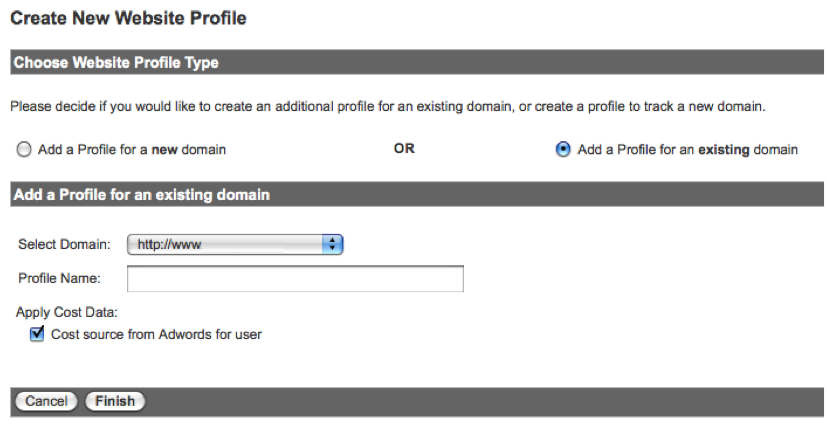
At the bottom, find and click on Add Website Profile.

create new profile

You want to Add a Profile for an existing domain and then select the domain and enter a Profile Name. I suggest something easy and descriptive like “Google Rank”.

create new google profile

When you’re done you’ll see a new profile appear in your Analytics Settings list. Don’t worry if you see a yellow triangle with an exclamation point in the Status column. The tracking for a new profile takes a bit of time to populate. As long as the current tracking for that domain is working, this will take care of itself.

2. Create Profile Filters

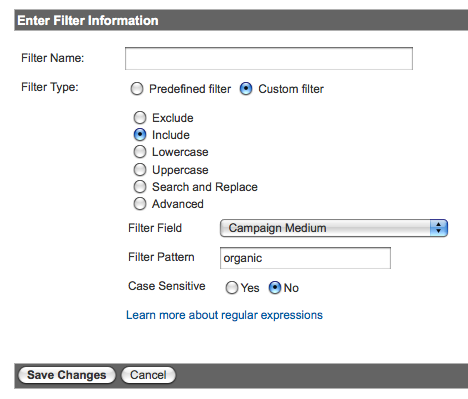
Click the Edit link next to your new profile so you can create three filters. The first ensures this profile will only report organic traffic.

analytics organic filter

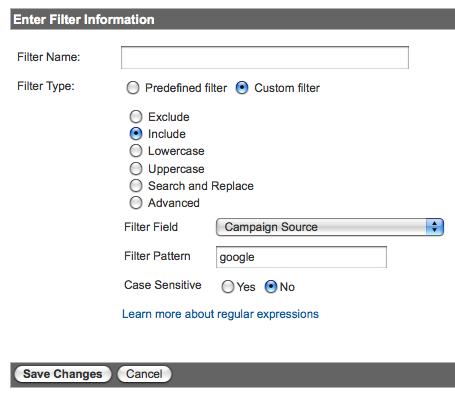
The second ensures this profile will only report Google traffic.

analytics google filter

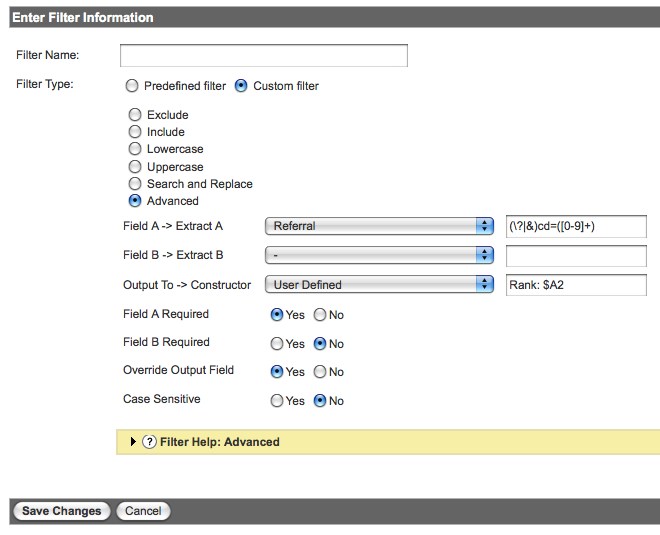
The third one is a bit more complicated and involves capturing the keyword rank using a regular expression in an Advanced Filter.

google analytics keyword rank filter

If the picture isn’t clear enough you want to enter: (\?|&)cd=([0-9]+)

All the regular expression is doing is looking for that special parameter (?cd= or &cd=) in the URL and then capturing the number (aka rank) after the cd= and using it in the User Defined field. You might be able to get away with just &cd=([0-9]+) but smart folks like Yoast are using both. I did a quick test and captured that data ($A1) and found 100% of it to be the ampersand (&). That said, I recommend covering your bases and match on both.

Remember to be sure to use $A2 since the number 2 refers to the second parenthesis where you’re capturing rank. If you’re interested (like I was) the advanced filters help on Google isn’t a bad read and this regex cheat sheet is a nice reference as well.

That’s it! Really, you’re done.

3. Wait and Review Your Keyword Ranking Reports

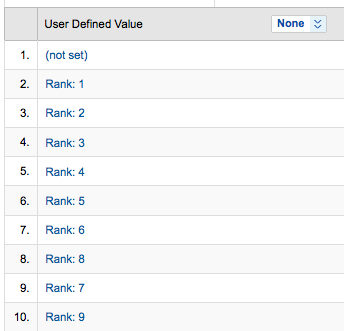
google keyword ranking report

You’ll have to wait a day for the data to be collected since filters are not retroactive.

Wake up the next day and visit your new Google Rank profile. You’ll need to navigate to the User Defined section under Visitors. Once you click User Defined you’ll hopefully see a clean keyword ranking report. The (not set) value at the top indicates that no rank was captured, most likely because it was not an AJAX search result.

Now, there are other ways to configure these filters to combine keyword and rank, or exclude non-AJAX URLs. I’ve chosen to do itthis way because I find it easier to view and more flexible in creating additional filters and custom reports. That’s not to say that you couldn’t create yet another profile to try different filter variations. Don’t be afraid to try (and break) things until you figure it out.

Need to Know About facebook Changes

I've got a link roundup here, with a little context to help you make the most of it.

First, you can watch the keynote on Facebook's official site.

Next, please be sure to familiarize yourself with Bobbi Newman's writeup over at Librarian by Day that noted you have to opt out of the setting. If you'd like to do that, you can:
1. Go to your to your privacy settings --> Applications and Websites and uncheck box at the bottom.
2. Then click on the links to Yelp, Pandora and MicrosoftDocs.om on Facebook and click on “Block Application”

One of their most important takeaways: "Public no longer means 'public on Facebook,' it means 'public in the Facebook ecosystem.'" - i.e., the Web. That's right. My old chestnut is more true than ever: whatever happens in Vegas stays on Google.


ReadWriteWeb has The Definitive Assessment for Publishers, Users and Competitors (and upon reading it, I agree - it is definitive)
Summary: For users, it's about privacy. For publishers, it's an opportunity to make your content sociable, ratable and part of a pseudo-CRM system. And competitors are essentially on notice to collaborate or die.

And if those didn't answer your questions, GigaOm has Your Mom's Guide to Those Facebook Changes.


Another Blip on the Radar
As if Facebook's announcement didn't send enough of a shockwave through the privacy ecosystem, Friday brought another concern. Blippy, a social sharing site that lets friends know what you purchased, screwed up royally when they released some credit card numbers of members. The full credit card numbers that Blippy members used to make purchases were visible via a Google search.

Blippy then went on to explain exactly how it is that something like that could have happened. But the damage was already done. While they may not have lost a ton of customers, there may be a good number of them who'll simply never return. And Blippy's tepid response to the crisis, was slow and lacking in empathy; their original blog post on Friday, April 23 (which has since been changed, I might add - tsk, tsk) stated: "While it looks super-scary and certainly sucks for those few people who were affected, and is embarrassing to us, it's a lot less bad than it looks." They updated their stance as of Monday the 26th, but as I said, it may be too late for them already.


So that's the last week in privacy. If you don't mind sharing your identity, feel free to jump in with a comment on your thoughts on the latest developments.